> ## Documentation Index
> Fetch the complete documentation index at: https://docs-v1.latitude.so/llms.txt
> Use this file to discover all available pages before exploring further.
# Triggers
> Enables automatic execution of prompts based on specific events or schedules
## Overview
The Triggers feature enables automatic execution of prompts based on specific events or schedules. This documentation explains how to configure triggers via Email or Schedule and describes each available setting.
Triggers allow you to:
* Automate prompt runs when specific conditions are met (e.g., receiving an email, or on a set schedule).
* Define who can trigger prompts and under what circumstances.
* Configure parameters and access control for secure, contextual automation.
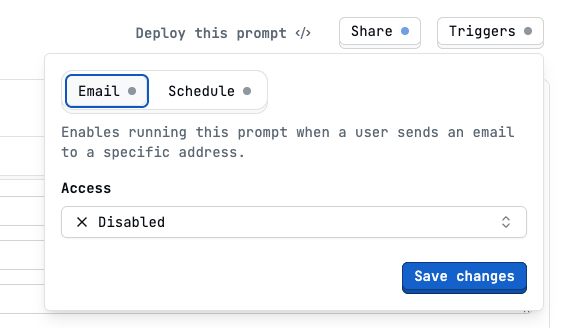
To access the triggers you have to click in the top right corner of the prompt playground
 ## Trigger Types
You can set up two main types of triggers
* Email
* Schedule
### Email
Allows running a prompt when an email is sent to a designated address.
## Trigger Types
You can set up two main types of triggers
* Email
* Schedule
### Email
Allows running a prompt when an email is sent to a designated address.
 **Parameters**
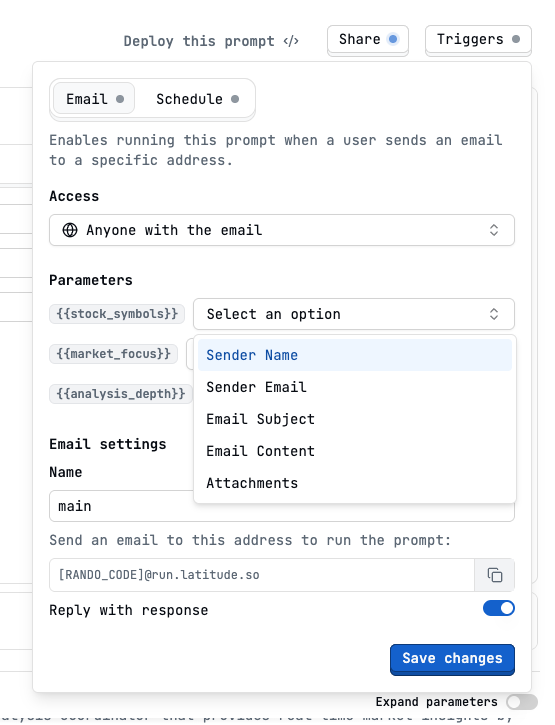
You may define how the paramters from the prompt are filled with the email the users sent to the trigger email address.
In this image we have 3 parameters in this prompt.
Users must provide these parameters when triggering the prompt by email.
**Email Settings**
* `Name` Give your email trigger a name (used to distinguish between triggers).
* `Prompt Email Address`: A unique email address is generated for your trigger
* `Reply with response`: Toggle to automatically reply to the sender with the prompt’s output.
## Schedule
**Parameters**
You may define how the paramters from the prompt are filled with the email the users sent to the trigger email address.
In this image we have 3 parameters in this prompt.
Users must provide these parameters when triggering the prompt by email.
**Email Settings**
* `Name` Give your email trigger a name (used to distinguish between triggers).
* `Prompt Email Address`: A unique email address is generated for your trigger
* `Reply with response`: Toggle to automatically reply to the sender with the prompt’s output.
## Schedule
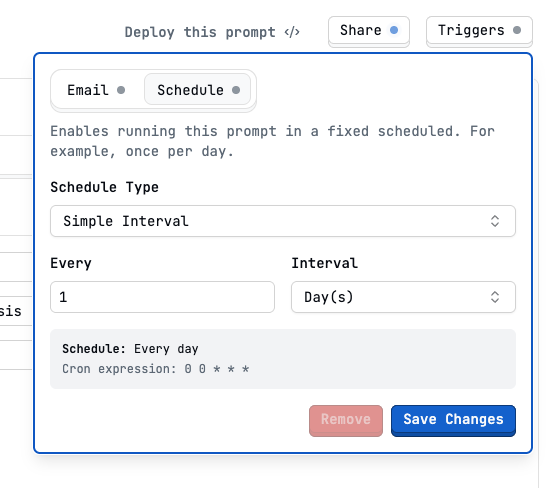 Allows running a prompt on a fixed schedule, such as every hour, daily, or based on a cron expression.
You can combine a trigger with an MCP and built a automated workflow that runs a prompt on a schedule and sends the output to a specific channel.
Allows running a prompt on a fixed schedule, such as every hour, daily, or based on a cron expression.
You can combine a trigger with an MCP and built a automated workflow that runs a prompt on a schedule and sends the output to a specific channel.