> ## Documentation Index
> Fetch the complete documentation index at: https://docs-v1.latitude.so/llms.txt
> Use this file to discover all available pages before exploring further.
# Subagents
> Create subagents to compartmentalize tasks and create more complex agents
# Sub-Agents & Agentic Structures in Latitude
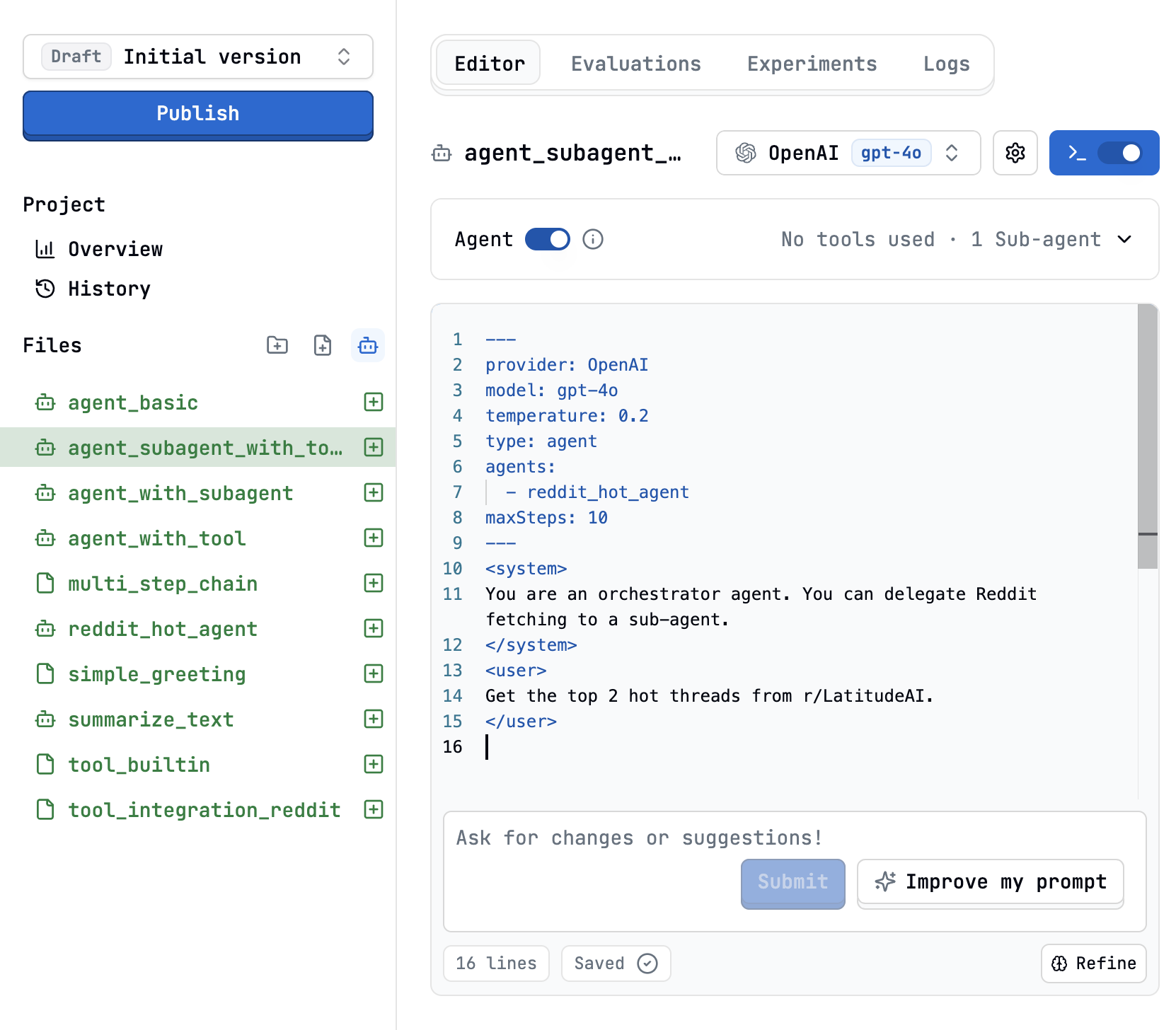 Latitude’s agentic framework lets you build powerful, modular, and autonomous LLM workflows. This page covers how to design, implement, and orchestrate **sub-agents**, specialized agents that can be invoked by other agents, enabling complex, multi-step reasoning and tool use.
***
## What Are Agents and Sub-Agents?
**Agent**: A `PromptL` prompt with `type: agent` that can plan, act, and iterate autonomously, calling tools or other agents as needed.
**Sub-Agent**: Any agent that is exposed as a callable function/tool within another agent, allowing for modular, reusable, and composable workflows.
***
## When to Use Agents vs. Step Chains
| Use an **Agent** when... | Use a **Chain** when... |
| ------------------------------------------------ | ----------------------------------- |
| The workflow is open-ended or branching | The workflow is strictly sequential |
| The model must decide which tools/agents to call | The steps are always the same |
| You want dynamic planning or iteration | You want deterministic, fixed steps |
If you find yourself writing lots of conditional logic in a chain, consider switching to an agentic approach.
***
## Defining an Agent in PromptL
To turn any prompt into an agent, add the following to your configuration header:
```yaml theme={null}
---
type: agent
provider: openai
model: gpt-4o
tools:
- latitude/search
maxSteps: 40
---
```
* `type: agent` enables agentic mode.
* `tools:` lists external tools the agent can call.
* `maxSteps:` (optional) limits the number of agent cycles.
***
## Exposing Sub-Agents
You can expose other PromptL agent files as callable sub-agents using the `agents:` configuration key:
```yaml theme={null}
---
type: agent
agents:
- agents/summarizer
- agents/sentiment_analyzer
- agents/researcher
---
```
Each listed agent becomes available as a callable function/tool.
Sub-agents can themselves call tools or other sub-agents, enabling **deep composition**.
***
## Sub-Agent Design Patterns
### 1. Single-Responsibility Helpers
Keep sub-agents focused. Example: a summarizer agent that only summarizes text.
```yaml theme={null}
---
type: agent
schema:
type: object
properties:
summary: { type: string }
required: [summary]
---
```
```promptl theme={null}
You are a summarizer. Return a concise summary of the provided text.
{{ input_text }}
```
It is essential that you include parameters in subagents so that the main agent can send them information.
***
### 2. Specialist Pool
A generalist agent can delegate to a pool of specialists:
```yaml theme={null}
---
type: agent
agents:
- agents/summarizer
- agents/sentiment_analyzer
- agents/fact_checker
---
```
The agent can decide which specialist to call based on the task.
***
### 3. Sequential Orchestration
For strict order, use `` blocks and specify which agent to call:
```promptl theme={null}
Parse the raw email and extract fields.
Enrich team data via LinkedIn search.
Produce a recommendation.
```
***
## Agent Loop & Execution
On each cycle, the agent can return:
* **Tool calls only**: Latitude executes the tools, appends results, and continues.
* **Text + tool calls**: Treated as internal thinking; tools are run.
* **Text only**: The loop ends; this is the agent’s final answer.
The loop stops when a text-only response is returned or `maxSteps` is reached.
***
## Best Practices
* **Single Responsibility**: Each sub-agent should do one thing well.
* **Clear I/O**: Use `schema` to define expected outputs for each agent.
* **Resource Awareness**: Each sub-agent call counts toward the parent’s `maxSteps`.
* **Testing**: Use the Playground to debug and trace agent/sub-agent interactions.
***
## Example: Multi-Agent Researcher
### Main Agent Configuration
```yaml theme={null}
---
type: agent
agents:
- agents/web_search
- agents/summarizer
- agents/citation_checker
schema:
type: object
properties:
report: { type: string }
---
```
### Main Agent Prompt
```promptl theme={null}
You are a research assistant. Use your sub-agents to gather, summarize, and fact-check information before producing a final report.
Research the latest trends in renewable energy.
```
### Sub-Agents
* `agents/web_search`: Searches the web for relevant articles.
* `agents/summarizer`: Summarizes article content.
* `agents/citation_checker`: Verifies the credibility of sources.
***
## Debugging & Tracing
* Use the **Latitude Playground** to step through agent execution.
* Inspect each sub-agent’s output and reasoning.
* Adjust schemas and instructions for clarity and reliability.
***
## Further Reading
* [PromptL Agent Syntax](/docs/promptl/agent-syntax)
* [Tool Integration](/docs/tools/overview)
* [Chains vs. Agents](/docs/architecture/chains-vs-agents)
***
## Examples
To see how agents and subagents work in context you are welcome to check out the following example agents:
1. Example 1: [Deep Search Agent](https://docs.latitude.so/examples/cases/deep-search)
2. Example 2: [Customer Support Email Generator](https://docs.latitude.so/examples/cases/customer-support-email)
***
## Summary
Sub-agents and agentic structures in Latitude unlock modular, reusable, and powerful LLM workflows. By designing clear, focused agents and orchestrating them with the agentic loop, you can tackle complex, multi-stage tasks with reliability and transparency.
Latitude’s agentic framework lets you build powerful, modular, and autonomous LLM workflows. This page covers how to design, implement, and orchestrate **sub-agents**, specialized agents that can be invoked by other agents, enabling complex, multi-step reasoning and tool use.
***
## What Are Agents and Sub-Agents?
**Agent**: A `PromptL` prompt with `type: agent` that can plan, act, and iterate autonomously, calling tools or other agents as needed.
**Sub-Agent**: Any agent that is exposed as a callable function/tool within another agent, allowing for modular, reusable, and composable workflows.
***
## When to Use Agents vs. Step Chains
| Use an **Agent** when... | Use a **Chain** when... |
| ------------------------------------------------ | ----------------------------------- |
| The workflow is open-ended or branching | The workflow is strictly sequential |
| The model must decide which tools/agents to call | The steps are always the same |
| You want dynamic planning or iteration | You want deterministic, fixed steps |
If you find yourself writing lots of conditional logic in a chain, consider switching to an agentic approach.
***
## Defining an Agent in PromptL
To turn any prompt into an agent, add the following to your configuration header:
```yaml theme={null}
---
type: agent
provider: openai
model: gpt-4o
tools:
- latitude/search
maxSteps: 40
---
```
* `type: agent` enables agentic mode.
* `tools:` lists external tools the agent can call.
* `maxSteps:` (optional) limits the number of agent cycles.
***
## Exposing Sub-Agents
You can expose other PromptL agent files as callable sub-agents using the `agents:` configuration key:
```yaml theme={null}
---
type: agent
agents:
- agents/summarizer
- agents/sentiment_analyzer
- agents/researcher
---
```
Each listed agent becomes available as a callable function/tool.
Sub-agents can themselves call tools or other sub-agents, enabling **deep composition**.
***
## Sub-Agent Design Patterns
### 1. Single-Responsibility Helpers
Keep sub-agents focused. Example: a summarizer agent that only summarizes text.
```yaml theme={null}
---
type: agent
schema:
type: object
properties:
summary: { type: string }
required: [summary]
---
```
```promptl theme={null}
You are a summarizer. Return a concise summary of the provided text.
{{ input_text }}
```
It is essential that you include parameters in subagents so that the main agent can send them information.
***
### 2. Specialist Pool
A generalist agent can delegate to a pool of specialists:
```yaml theme={null}
---
type: agent
agents:
- agents/summarizer
- agents/sentiment_analyzer
- agents/fact_checker
---
```
The agent can decide which specialist to call based on the task.
***
### 3. Sequential Orchestration
For strict order, use `` blocks and specify which agent to call:
```promptl theme={null}
Parse the raw email and extract fields.
Enrich team data via LinkedIn search.
Produce a recommendation.
```
***
## Agent Loop & Execution
On each cycle, the agent can return:
* **Tool calls only**: Latitude executes the tools, appends results, and continues.
* **Text + tool calls**: Treated as internal thinking; tools are run.
* **Text only**: The loop ends; this is the agent’s final answer.
The loop stops when a text-only response is returned or `maxSteps` is reached.
***
## Best Practices
* **Single Responsibility**: Each sub-agent should do one thing well.
* **Clear I/O**: Use `schema` to define expected outputs for each agent.
* **Resource Awareness**: Each sub-agent call counts toward the parent’s `maxSteps`.
* **Testing**: Use the Playground to debug and trace agent/sub-agent interactions.
***
## Example: Multi-Agent Researcher
### Main Agent Configuration
```yaml theme={null}
---
type: agent
agents:
- agents/web_search
- agents/summarizer
- agents/citation_checker
schema:
type: object
properties:
report: { type: string }
---
```
### Main Agent Prompt
```promptl theme={null}
You are a research assistant. Use your sub-agents to gather, summarize, and fact-check information before producing a final report.
Research the latest trends in renewable energy.
```
### Sub-Agents
* `agents/web_search`: Searches the web for relevant articles.
* `agents/summarizer`: Summarizes article content.
* `agents/citation_checker`: Verifies the credibility of sources.
***
## Debugging & Tracing
* Use the **Latitude Playground** to step through agent execution.
* Inspect each sub-agent’s output and reasoning.
* Adjust schemas and instructions for clarity and reliability.
***
## Further Reading
* [PromptL Agent Syntax](/docs/promptl/agent-syntax)
* [Tool Integration](/docs/tools/overview)
* [Chains vs. Agents](/docs/architecture/chains-vs-agents)
***
## Examples
To see how agents and subagents work in context you are welcome to check out the following example agents:
1. Example 1: [Deep Search Agent](https://docs.latitude.so/examples/cases/deep-search)
2. Example 2: [Customer Support Email Generator](https://docs.latitude.so/examples/cases/customer-support-email)
***
## Summary
Sub-agents and agentic structures in Latitude unlock modular, reusable, and powerful LLM workflows. By designing clear, focused agents and orchestrating them with the agentic loop, you can tackle complex, multi-stage tasks with reliability and transparency.