> ## Documentation Index
> Fetch the complete documentation index at: https://docs-v1.latitude.so/llms.txt
> Use this file to discover all available pages before exploring further.
# OpenAI
> Common questions about the OpenAI provider
## How do I set the OpenAI endpoint?
You can use either the classic OpenAI [Chat Completions](https://platform.openai.com/docs/api-reference/chat) or [Responses](https://platform.openai.com/docs/api-reference/responses) endpoints.
To select your preferred endpoint when creating the provider, follow these steps:
1. Go to the **Settings** section.
2. Click on **Providers**.
3. Select **OpenAI** from the list of providers.
4. Choose the endpoint you want to use.
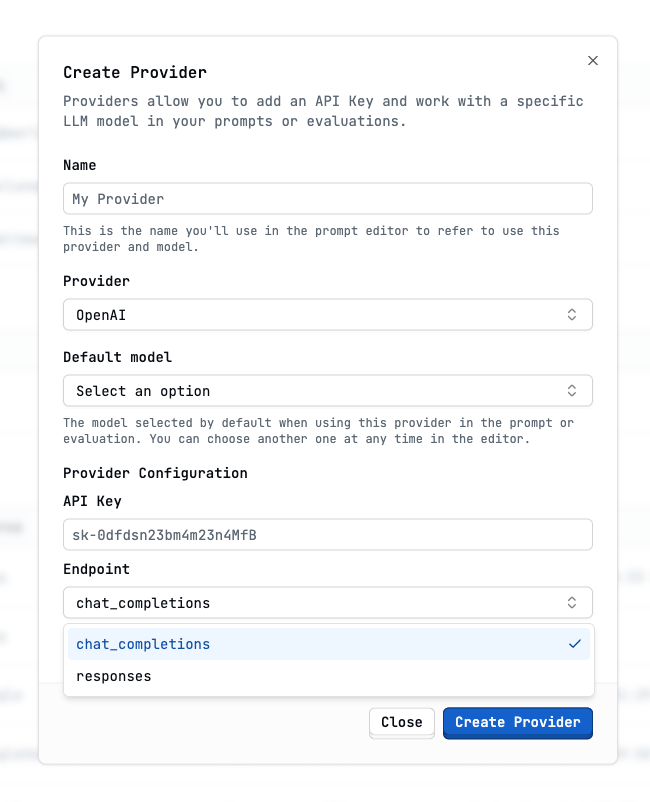 Once you select an endpoint, all prompts using this provider will use that
same endpoint.
### Responses API
#### OpenAI built-in tools
When using [Responses](https://platform.openai.com/docs/api-reference/responses), you can access OpenAI's [built-in tools](https://platform.openai.com/docs/guides/tools?api-mode=responses), such as web search:
```markdown {6-8} theme={null}
---
provider: my-openai-provider
model: gpt-4.1
temperature: 0.1
tools:
- openai:
- type: web_search_preview
search_context_size: low
---
```
## How do I set the OpenAI thinking budget?
The latest OpenAI models have a configurable [thinking budget](https://platform.openai.com/docs/guides/reasoning?api-mode=responses) that allows you to control the amount of time the model spends reasoning to generate a response.
```markdown {4-5} theme={null}
---
provider: name-of-your-openai-provider-in-latitude
model: o4-mini
reasoningSummary: detailed
reasoningEffort: high
---
```
The **Chat Completions** API does not support reasoning summaries. Switch to
the **Responses** API for a better experience.
Once you select an endpoint, all prompts using this provider will use that
same endpoint.
### Responses API
#### OpenAI built-in tools
When using [Responses](https://platform.openai.com/docs/api-reference/responses), you can access OpenAI's [built-in tools](https://platform.openai.com/docs/guides/tools?api-mode=responses), such as web search:
```markdown {6-8} theme={null}
---
provider: my-openai-provider
model: gpt-4.1
temperature: 0.1
tools:
- openai:
- type: web_search_preview
search_context_size: low
---
```
## How do I set the OpenAI thinking budget?
The latest OpenAI models have a configurable [thinking budget](https://platform.openai.com/docs/guides/reasoning?api-mode=responses) that allows you to control the amount of time the model spends reasoning to generate a response.
```markdown {4-5} theme={null}
---
provider: name-of-your-openai-provider-in-latitude
model: o4-mini
reasoningSummary: detailed
reasoningEffort: high
---
```
The **Chat Completions** API does not support reasoning summaries. Switch to
the **Responses** API for a better experience.