> ## Documentation Index
> Fetch the complete documentation index at: https://docs-v1.latitude.so/llms.txt
> Use this file to discover all available pages before exploring further.
# Programmatic Rules
> Use code-based metrics and rules to objectively evaluate prompt outputs.
Programmatic Rule evaluations apply objective, code-based rules and metrics to assess prompt outputs. They are ideal for validating specific requirements, checking against ground truth, and enforcing constraints automatically.
* **How it works**: Applies code-based rules and metrics to check outputs against objective criteria.
* **Best for**: Objective checks, ground truth comparisons (using datasets), format validation (JSON, regex), safety checks (keyword detection), length constraints.
* **Requires**: Defining specific rules (e.g., exact match, contains keyword, JSON schema validation) and potentially providing a [Dataset](/guides/datasets/overview) with expected outputs.
For subjective criteria, use
[LLM-as-Judge](/guides/evaluations/llm-as-judges). For human preferences, use
[HITL (Human In The Loop)](/guides/evaluations/humans-in-the-loop).
## Setup
Go to evaluations tab on a prompt in one of your projects.
On the top right corner, click on the "Add evaluation" button.
Choose "Programatic Rule" tab in the evaluation modal. 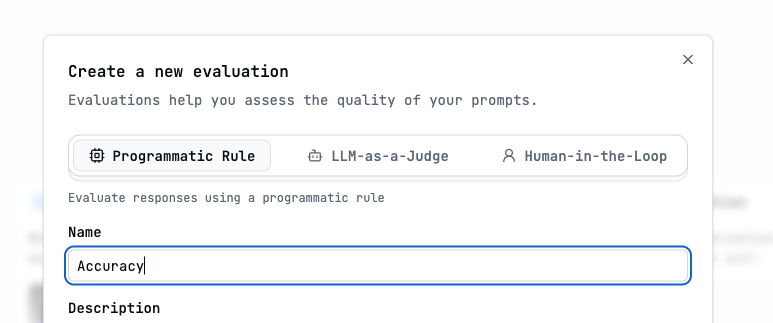
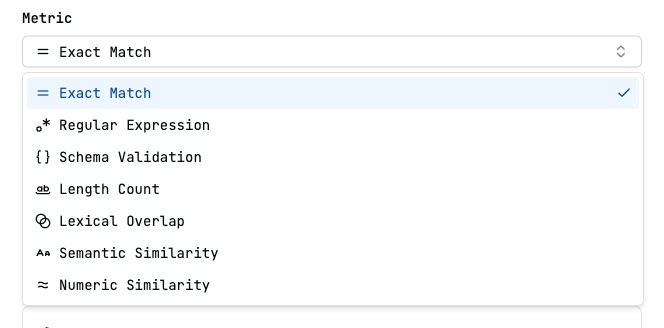 ## Metrics
Checks if the response is exactly the same as the expected output. The
resulting score is "matched" or "unmatched".
Checks if the response matches the regular expression. The resulting score is
"matched" or "unmatched".
Checks if the response follows the schema. The resulting score is "valid" or
"invalid". Right now only JSON schemas are supported.
Checks if the response is of a certain length. The resulting score is the
length of the response. The length can be counted by characters, words or
sentences.
Checks if the response contains the expected output. The resulting score is
the percentage of overlap. Overlap can be measured with longest common
substring, Levenshtein distance and ROUGE algorithms.
Checks if the response is semantically similar to the expected output. The
resulting score is the percentage of similarity. Similarity is measured by
computing the cosine distance.
Checks if the response is numerically similar to the expected output. The
resulting score is the percentage of similarity. Similarity is measured by
computing the relative difference.
## Expected output
The expected output, also known as label, refers to the correct or ideal response that the language model should generate for a given prompt. You can create datasets with expected output columns to evaluate prompts with ground truth.
**Exact Match**, **Lexical Overlap**, **Semantic Similarity** and **Numeric
Similarity** metrics require an expected output.
## Using Datasets for Ground Truth
Many programmatic rules (Exact Match, Lexical Overlap, Semantic Similarity) require comparing the model's output against a known correct answer (`expected_output`). This is typically done by:
1. Creating a [Dataset](/guides/datasets/overview) containing input examples and their corresponding desired outputs.
2. Configuring the evaluation rule to use the `expected_output` column from that dataset.
3. Running the evaluation in [an experiment](/guides/evaluations/running-evaluations#running-evaluations-on-datasets-run-experiment) on that dataset.
## Metrics
Checks if the response is exactly the same as the expected output. The
resulting score is "matched" or "unmatched".
Checks if the response matches the regular expression. The resulting score is
"matched" or "unmatched".
Checks if the response follows the schema. The resulting score is "valid" or
"invalid". Right now only JSON schemas are supported.
Checks if the response is of a certain length. The resulting score is the
length of the response. The length can be counted by characters, words or
sentences.
Checks if the response contains the expected output. The resulting score is
the percentage of overlap. Overlap can be measured with longest common
substring, Levenshtein distance and ROUGE algorithms.
Checks if the response is semantically similar to the expected output. The
resulting score is the percentage of similarity. Similarity is measured by
computing the cosine distance.
Checks if the response is numerically similar to the expected output. The
resulting score is the percentage of similarity. Similarity is measured by
computing the relative difference.
## Expected output
The expected output, also known as label, refers to the correct or ideal response that the language model should generate for a given prompt. You can create datasets with expected output columns to evaluate prompts with ground truth.
**Exact Match**, **Lexical Overlap**, **Semantic Similarity** and **Numeric
Similarity** metrics require an expected output.
## Using Datasets for Ground Truth
Many programmatic rules (Exact Match, Lexical Overlap, Semantic Similarity) require comparing the model's output against a known correct answer (`expected_output`). This is typically done by:
1. Creating a [Dataset](/guides/datasets/overview) containing input examples and their corresponding desired outputs.
2. Configuring the evaluation rule to use the `expected_output` column from that dataset.
3. Running the evaluation in [an experiment](/guides/evaluations/running-evaluations#running-evaluations-on-datasets-run-experiment) on that dataset.