> ## Documentation Index
> Fetch the complete documentation index at: https://docs-v1.latitude.so/llms.txt
> Use this file to discover all available pages before exploring further.
# Humans-in-the-Loop
> Incorporate manual reviews and direct human feedback into your evaluation workflow.
Human-in-the-Loop (HITL) involve direct human review and assessment of prompt outputs. This method is essential for capturing nuanced judgments, user preferences, and criteria that are difficult for automated systems to evaluate.
* **How it works**: Team members manually review prompt outputs (logs) and assign scores or labels based on their judgment.
* **Best for**: Capturing nuanced human preferences, evaluating criteria difficult for LLMs to judge, initial quality assessment, creating golden datasets for other evaluation types.
* **Requires**: Setting up manual review workflows and criteria for reviewers.
Because HITL evaluations require manual input, they **do not support automatic
live or batch execution** like LLM-as-Judge or Programmatic Rules. Feedback
must be submitted individually for each log reviewed.
## Setup
Go to evaluations tab on a prompt in one of your projects.
On the top right corner, click on the "Add evaluation" button.
Choose "Human-in-the-Loop" tab in the evaluation modal. 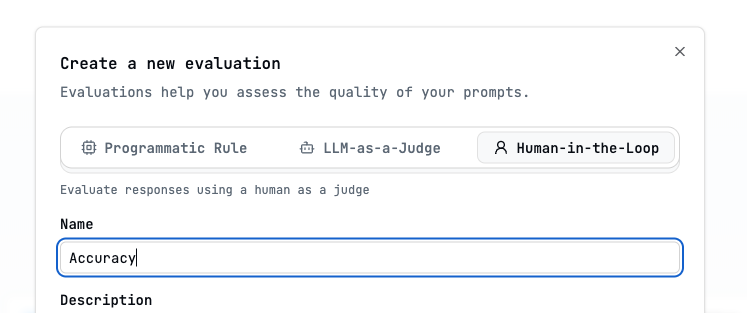
 ## Metrics
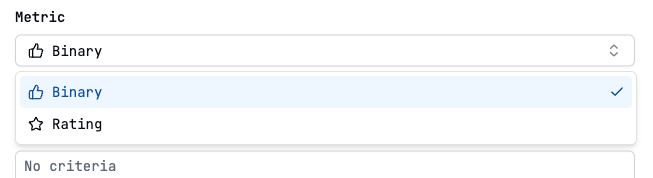
Judges whether the response meets the criteria. The resulting score is
"passed" or "failed"
Judges the response by rating it under a criteria. The resulting score is the
rating
## Annotate logs in Latitude UI
Manually submitted results appear alongside other evaluation results:
* **Logs View**: Attached to the individual log entry.
* **Evaluations Tab**: Aggregated statistics and distributions for the HITL evaluation.
## Capturing Feedback via API/SDK
Check [how to annotate a log](/examples/sdk/annotate-log). A log is the result of running your prompt. So the person can annotate that result and tell if it was good or bad, or provide a score.
## Metrics
Judges whether the response meets the criteria. The resulting score is
"passed" or "failed"
Judges the response by rating it under a criteria. The resulting score is the
rating
## Annotate logs in Latitude UI
Manually submitted results appear alongside other evaluation results:
* **Logs View**: Attached to the individual log entry.
* **Evaluations Tab**: Aggregated statistics and distributions for the HITL evaluation.
## Capturing Feedback via API/SDK
Check [how to annotate a log](/examples/sdk/annotate-log). A log is the result of running your prompt. So the person can annotate that result and tell if it was good or bad, or provide a score.