> ## Documentation Index
> Fetch the complete documentation index at: https://docs-v1.latitude.so/llms.txt
> Use this file to discover all available pages before exploring further.
# Pre-Seed Startup analysis
> Specification for AI-Powered Pre-Seed Startup Analysis Tool using Latitude
Try out this agent setup in the Latitude Playground.
## Objective
We want to create an AI-powered tool that can analyze pre-seed startups based on pitch decks and other documents. The tool will extract key information, conduct research, and generate a structured report in Notion.
Let's put an example.
### Input email
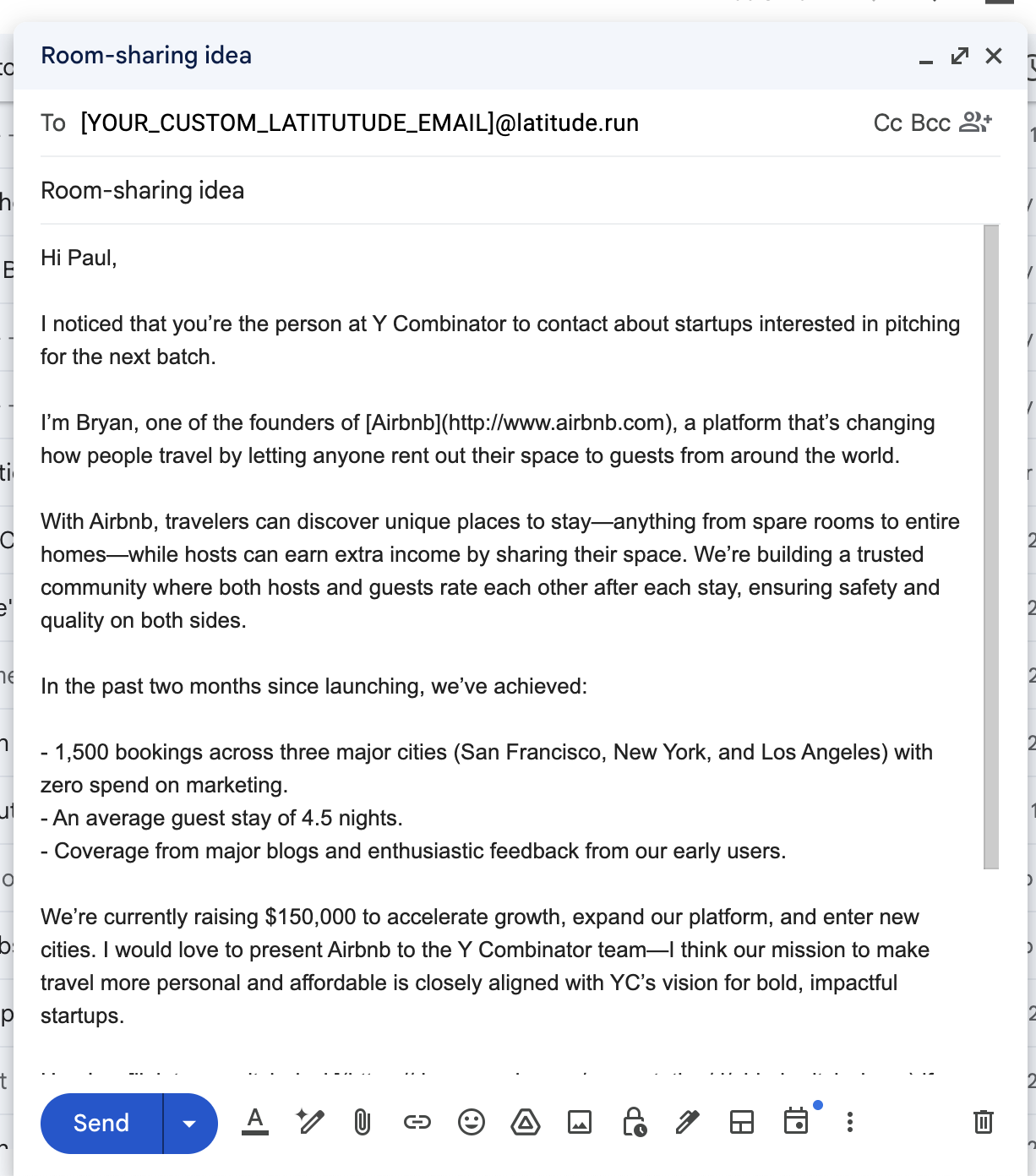
Let's ~~imagine~~ is 2008 and **Bryan Chesky** sends an email to a fund with a pitch deck for a startup called **Airbnb**. Our tech incubator is super successful and we don't want to miss any good candidates. So we create an agentic tool in
Latitude that can receive emails like this and analyze the startups that are being pitched.
 ### Analysis of the email
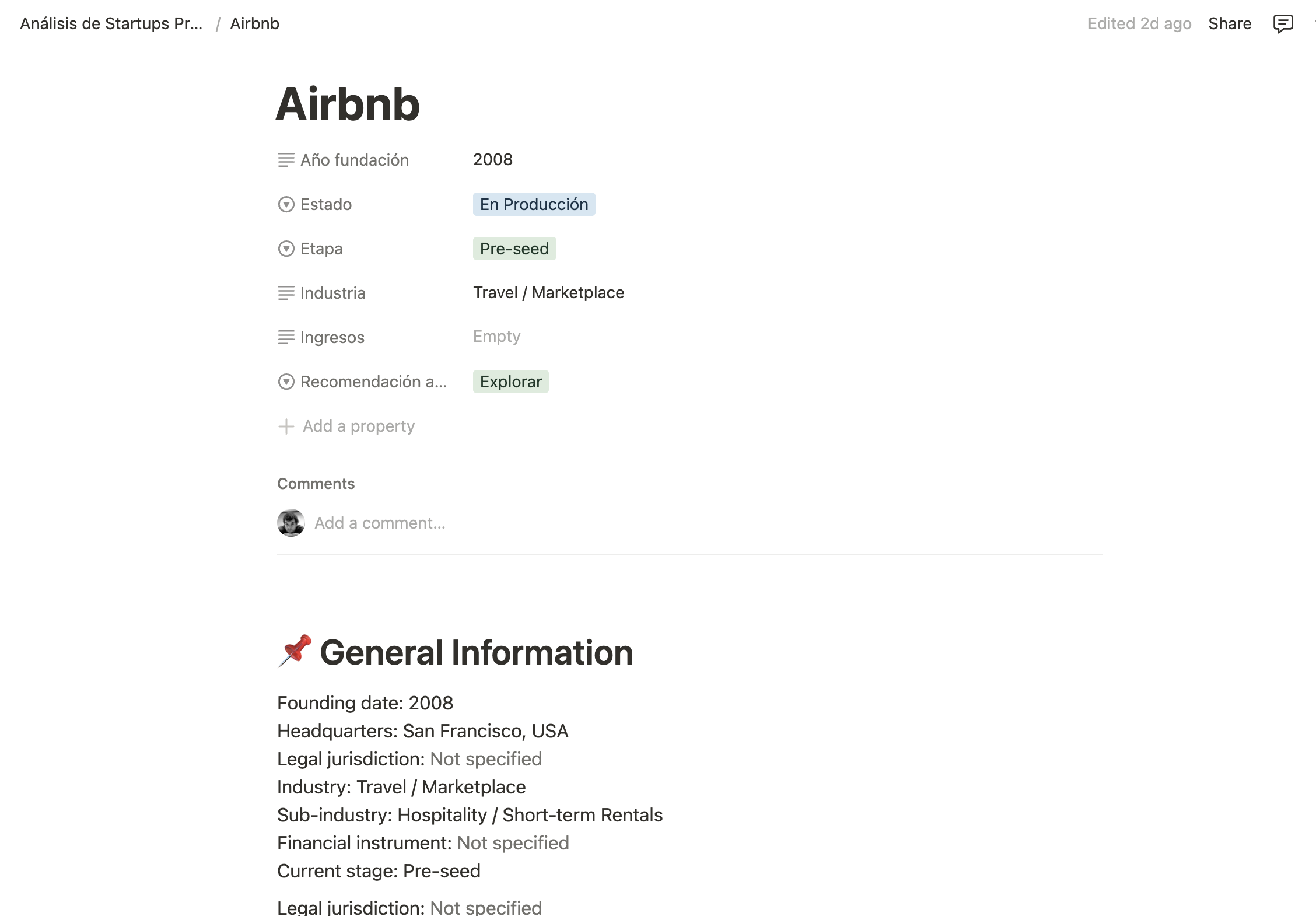
The final result is a structured report stored in a Notion database.
### Analysis of the email
The final result is a structured report stored in a Notion database.
 ## The setup
This project use different parts from Latitude let's start by listing them:
[Prompt references](/guides/prompt-manager/references) like for example `` allow you to reuse prompts in different parts of your project. This is useful to avoid duplication and keep your code DRY.
[Steps](/promptl/advanced/chains) allow to interact with the AI in a step-by-step manner, breaking down complex tasks into manageable parts. In this case, we use steps to handle the analysis of the startup in a structured way.
```markdown steps theme={null}
1. Interpretation:
You should use the `interpreter` agent to extract and organize all the official information provided in the email, including the complete content and attached URLs.
2. Team identification:
You should use the `team_finder` agent to find the main team members.
3. Team verification:
You should use the `identity_checker` agent to validate the background and profiles of all founders and key members.
4. Traction metrics:
You should use the `metrics_hunter` agent to search and confirm data about users, revenue, growth, etc.
5. Business model:
You should use the `business_model_analyzer` agent to investigate and analyze the business model.
6. Funding:
You should use the `investigator` agent to research investment rounds, investors, and valuation.
7. Product analysis:
You should use the `tech_stacker` agent to investigate the technology used in the product.
8. Market analysis:
You should use the `market_mapper` agent to analyze the target market, size, and competitors.
9. Solution mapping:
You should use the `competition_research` agent to obtain an overview of all existing solutions to the problem the company is trying to solve, without bias.
11. Final evaluation:
You should use the `evaluation_expert` agent to evaluate the draft, identify strengths, risks, and issue a final recommendation.
```
Email triggers allows us to receive emails in our Latitude accoun when they are sent to a specific address.
[Check the docs](/guides/prompt-manager/triggers#email) to see how to set it up.
In latitude you convert a prompt into an agent by adding the `type: agent` field to the prompt. This allows you to create a multi-agent architecture where each agent is responsible for a specific task in the analysis process. You can learn more about agents in the [agents documentation](/guides/prompt-manager/agents).
[Latitude tools](/guides/prompt-manager/latitude-tools#defining-available-latitude-tools) are used to search information in Internet
In this example we use the [Notion MCP integration](/guides/integration/mcp-integrations) to call the Notion API and create a database item with the final report. MCP calls allow you to interact with external APIs in a structured way, making it easy to integrate with services like Notion.
We also use this [Apify MCP](https://apify.com/pratikdani/crunchbase-companies-scraper) to extract information from Crunchbase.
```markdown notion mcp {5-6} theme={null}
---
provider: Latitude
model: gpt-4o-mini
temperature: 0
tools:
- use_cases_notion/*
type: agent
---
```
```markdown crunchbase mcp {10-10} theme={null}
---
provider: Latitude
model: gpt-4o
temperature: 0
type: agent
description: Investigates the funding and fundraising history of the startup.
tools:
- latitude/search
- latitude/extract
- crunchbase/pratikdani-slash-crunchbase-companies-scraper
---
```
### Notion integration
Most of the elements used in this project are easy to understand following
Latitude documentation, but the Notion integration is a bit more complex. Let's
do a quick overview of how to set it up.
You need to create a [Notion workspace](https://www.notion.com/help/intro-to-workspaces)
Go to [Notion Integrations](https://www.notion.so/profile/integrations) and
create new integration for Latitude. You will need an API to setup the Notion's
MCP server on Latitude.
## The setup
This project use different parts from Latitude let's start by listing them:
[Prompt references](/guides/prompt-manager/references) like for example `` allow you to reuse prompts in different parts of your project. This is useful to avoid duplication and keep your code DRY.
[Steps](/promptl/advanced/chains) allow to interact with the AI in a step-by-step manner, breaking down complex tasks into manageable parts. In this case, we use steps to handle the analysis of the startup in a structured way.
```markdown steps theme={null}
1. Interpretation:
You should use the `interpreter` agent to extract and organize all the official information provided in the email, including the complete content and attached URLs.
2. Team identification:
You should use the `team_finder` agent to find the main team members.
3. Team verification:
You should use the `identity_checker` agent to validate the background and profiles of all founders and key members.
4. Traction metrics:
You should use the `metrics_hunter` agent to search and confirm data about users, revenue, growth, etc.
5. Business model:
You should use the `business_model_analyzer` agent to investigate and analyze the business model.
6. Funding:
You should use the `investigator` agent to research investment rounds, investors, and valuation.
7. Product analysis:
You should use the `tech_stacker` agent to investigate the technology used in the product.
8. Market analysis:
You should use the `market_mapper` agent to analyze the target market, size, and competitors.
9. Solution mapping:
You should use the `competition_research` agent to obtain an overview of all existing solutions to the problem the company is trying to solve, without bias.
11. Final evaluation:
You should use the `evaluation_expert` agent to evaluate the draft, identify strengths, risks, and issue a final recommendation.
```
Email triggers allows us to receive emails in our Latitude accoun when they are sent to a specific address.
[Check the docs](/guides/prompt-manager/triggers#email) to see how to set it up.
In latitude you convert a prompt into an agent by adding the `type: agent` field to the prompt. This allows you to create a multi-agent architecture where each agent is responsible for a specific task in the analysis process. You can learn more about agents in the [agents documentation](/guides/prompt-manager/agents).
[Latitude tools](/guides/prompt-manager/latitude-tools#defining-available-latitude-tools) are used to search information in Internet
In this example we use the [Notion MCP integration](/guides/integration/mcp-integrations) to call the Notion API and create a database item with the final report. MCP calls allow you to interact with external APIs in a structured way, making it easy to integrate with services like Notion.
We also use this [Apify MCP](https://apify.com/pratikdani/crunchbase-companies-scraper) to extract information from Crunchbase.
```markdown notion mcp {5-6} theme={null}
---
provider: Latitude
model: gpt-4o-mini
temperature: 0
tools:
- use_cases_notion/*
type: agent
---
```
```markdown crunchbase mcp {10-10} theme={null}
---
provider: Latitude
model: gpt-4o
temperature: 0
type: agent
description: Investigates the funding and fundraising history of the startup.
tools:
- latitude/search
- latitude/extract
- crunchbase/pratikdani-slash-crunchbase-companies-scraper
---
```
### Notion integration
Most of the elements used in this project are easy to understand following
Latitude documentation, but the Notion integration is a bit more complex. Let's
do a quick overview of how to set it up.
You need to create a [Notion workspace](https://www.notion.com/help/intro-to-workspaces)
Go to [Notion Integrations](https://www.notion.so/profile/integrations) and
create new integration for Latitude. You will need an API to setup the Notion's
MCP server on Latitude.
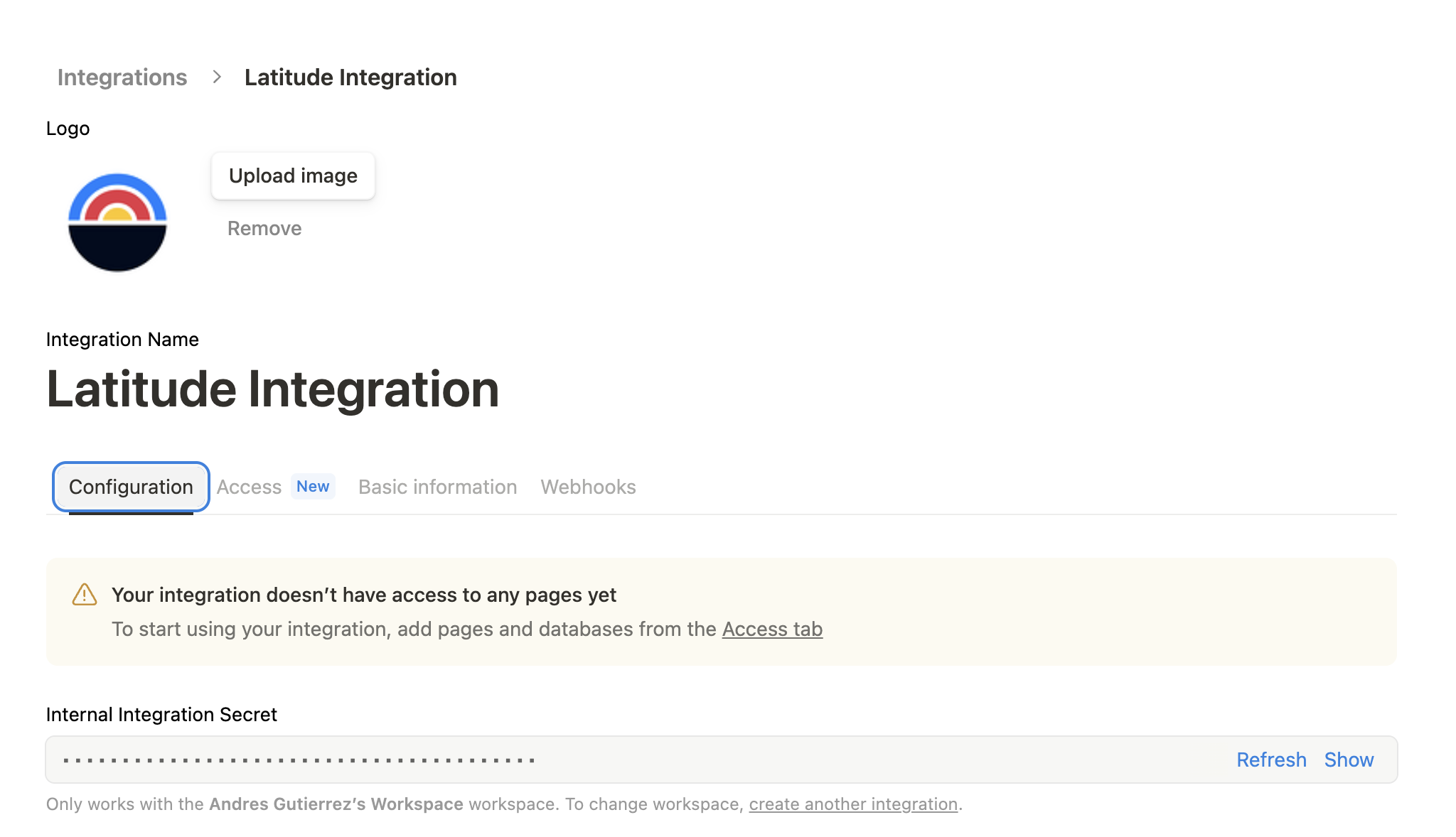
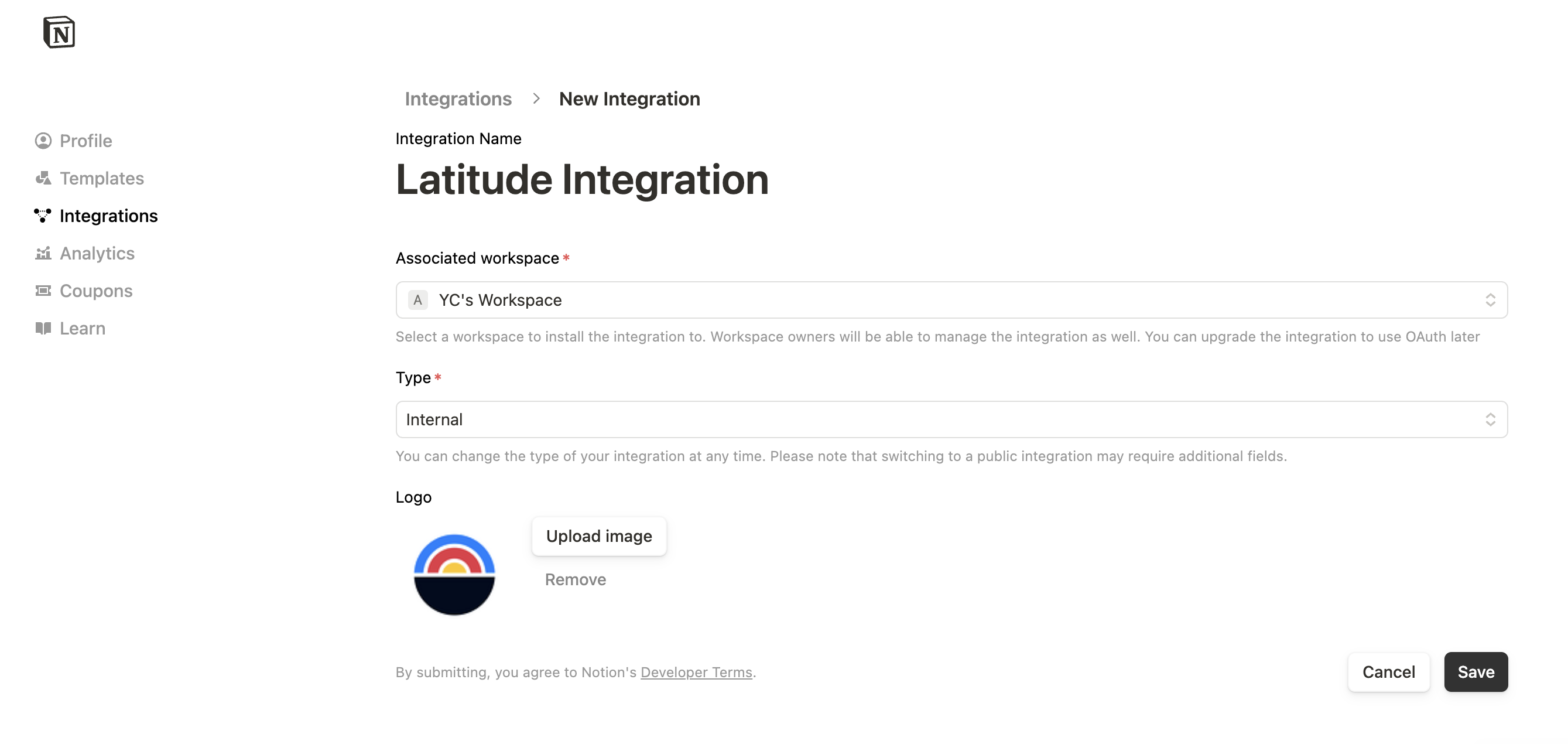 Once you have the integration we need do do 2 more things.
1. copy the **Internal Integration Token** for configuring the [MPC server](/guides/integration/mcp-integrations) on Latitude.
2. Give access to this integration to one of our pages in the workspace (yellow box in the image above).
Once you have the integration we need do do 2 more things.
1. copy the **Internal Integration Token** for configuring the [MPC server](/guides/integration/mcp-integrations) on Latitude.
2. Give access to this integration to one of our pages in the workspace (yellow box in the image above).
 ## The prompts
The tool is an [AI agent](/guides/prompt-manager/agents) divided in sub-agents, each responsible for a specific task in the analysis process. The main agent coordinates the workflow and ensures that all tasks are completed efficiently.
Latitude is flexible enough to allow you to structure workflows quite complex in a way that
makes sense for you. In this case we decided to create an `agents` folder with
all the processing work and a `publish` agent that is responsible for the
formatting and publishing of the final report in Notion.
```markdown main {8-17} theme={null}
---
provider: OpenAI
model: gpt-4.1
temperature: 0
type: agent
maxSteps: 40
agents:
- agents/interpreter
- agents/team_finder
- agents/identity_checker
- agents/metrics_hunter
- agents/investigator
- agents/competition_research
- agents/evaluation_expert
- agents/market_mapper
- agents/tech_stacker
- agents/business_model_analyzer
- publish
```
```markdown publish {8-9} theme={null}
---
provider: Latitude
model: gpt-4o-mini
type: agent
temperature: 0
maxSteps: 40
agents:
- notion/create_database_item
- notion/add_section_to_page
tools:
- use_cases_notion/*
---
```
Let's do a breakdown of all the prompts (agents) and their roles.
**Purpose**: Gather all foundational, official, and structured data directly from source materials (pitch decks, websites, emails).
**Agents**:
* `agents/interpreter`: Extracts comprehensive company, product, market, team, and funding information from any document or webpage.
* `agents/team_finder`: Collects a verified list of current team members, focusing on accuracy and relevance.
**Purpose**: Ensure accuracy, completeness, and credibility of extracted information; deepen profiles and history.
**Agents**:
* `agents/identity_checker`: Verifies founder and executive backgrounds using professional networks and databases.
* `agents/investigator`: Confirms fundraising history, round details, and investor lists using financial and deal sources.
**Purpose**: Contextualize the company within its business model, market, competition, and traction environment.
**Agents**:
* `agents/business_model_analysis`: Maps how the startup makes money, whom it serves, and how it goes to market.
* `agents/market_mapper`: Defines the addressable market, sizes opportunity, and identifies key competitors and trends.
* `agents/competition_research`: Builds a competitive landscape, classifying direct and indirect solutions in the space.
* `agents/tech_stacker`: Details technology stack and infrastructure, surfacing technical strengths or risks.
* `agents/metrics_hunter`: Finds, validates, and contextualizes traction metrics—users, revenue, growth, engagement.
If you want to really play with this example in live you can [copy it to
your Latitude account here](https://app.latitude.so/share/d/1613160f-3871-439f-baaa-c388248a6fe1)
## The prompts
The tool is an [AI agent](/guides/prompt-manager/agents) divided in sub-agents, each responsible for a specific task in the analysis process. The main agent coordinates the workflow and ensures that all tasks are completed efficiently.
Latitude is flexible enough to allow you to structure workflows quite complex in a way that
makes sense for you. In this case we decided to create an `agents` folder with
all the processing work and a `publish` agent that is responsible for the
formatting and publishing of the final report in Notion.
```markdown main {8-17} theme={null}
---
provider: OpenAI
model: gpt-4.1
temperature: 0
type: agent
maxSteps: 40
agents:
- agents/interpreter
- agents/team_finder
- agents/identity_checker
- agents/metrics_hunter
- agents/investigator
- agents/competition_research
- agents/evaluation_expert
- agents/market_mapper
- agents/tech_stacker
- agents/business_model_analyzer
- publish
```
```markdown publish {8-9} theme={null}
---
provider: Latitude
model: gpt-4o-mini
type: agent
temperature: 0
maxSteps: 40
agents:
- notion/create_database_item
- notion/add_section_to_page
tools:
- use_cases_notion/*
---
```
Let's do a breakdown of all the prompts (agents) and their roles.
**Purpose**: Gather all foundational, official, and structured data directly from source materials (pitch decks, websites, emails).
**Agents**:
* `agents/interpreter`: Extracts comprehensive company, product, market, team, and funding information from any document or webpage.
* `agents/team_finder`: Collects a verified list of current team members, focusing on accuracy and relevance.
**Purpose**: Ensure accuracy, completeness, and credibility of extracted information; deepen profiles and history.
**Agents**:
* `agents/identity_checker`: Verifies founder and executive backgrounds using professional networks and databases.
* `agents/investigator`: Confirms fundraising history, round details, and investor lists using financial and deal sources.
**Purpose**: Contextualize the company within its business model, market, competition, and traction environment.
**Agents**:
* `agents/business_model_analysis`: Maps how the startup makes money, whom it serves, and how it goes to market.
* `agents/market_mapper`: Defines the addressable market, sizes opportunity, and identifies key competitors and trends.
* `agents/competition_research`: Builds a competitive landscape, classifying direct and indirect solutions in the space.
* `agents/tech_stacker`: Details technology stack and infrastructure, surfacing technical strengths or risks.
* `agents/metrics_hunter`: Finds, validates, and contextualizes traction metrics—users, revenue, growth, engagement.
If you want to really play with this example in live you can [copy it to
your Latitude account here](https://app.latitude.so/share/d/1613160f-3871-439f-baaa-c388248a6fe1)